That's not a tooling problem. It's a coordination problem. Every step lived in a different app, owned by a different person, with no shared brief holding it together. By the time everything came back, the campaign it was meant to support had already shipped.
This article is about closing that gap. It's for marketers, founders, freelancers, and small teams who need video to ship reliably — without a production agency on retainer. We'll walk through what a modern Video Studio actually does, how it turns a brief into a finished clip in one place, and — just as important — when you should stop poking at the studio and instead chat with your AI team to think the project through first.
Why Video Got Urgent (and Why the Old Workflow Breaks)
Video stopped being a "nice to have" somewhere around the moment every channel started rewarding it. Product pages with a short demo convert better. Social feeds bury static images. Sales reps close faster when they can send a 60-second walkthrough instead of a wall of text. Support teams cut ticket volume with a quick how-to clip. The demand for video is everywhere — but the supply inside most small companies hasn't caught up.
Here's the uncomfortable truth: the traditional video workflow was built for big budgets and big timelines. It assumes you have a scriptwriter, a storyboard artist, a voice talent, an editor, and a project manager to keep them all in sync. Most small teams have one person wearing all five hats, often part-time, between other responsibilities.
When that one person tries to stitch together five separate tools, three things go wrong:
- Drift. The script says one thing, the storyboard shows another, the voice-over emphasizes a third. Nothing matches because nothing shares a source of truth.
- Stalls. Every handoff is a chance to wait. Wait for the freelancer. Wait for feedback. Wait for the re-render.
- Abandonment. Video projects quietly die in the "I'll finish it next week" folder more often than any other content type, because the friction per step is so high.
A single Video Studio attacks all three problems by keeping the brief, the storyboard, the visuals, the voice, and the final assembly under one roof. Instead of moving assets between apps and people, you move forward through stages — and the context travels with you. That's the difference between a tool and a workflow. The old way treats video as a relay race with dropped batons. The studio treats it as a single, continuous process you can actually finish in an afternoon.
From Brief to Finished Video: The One-Studio Workflow
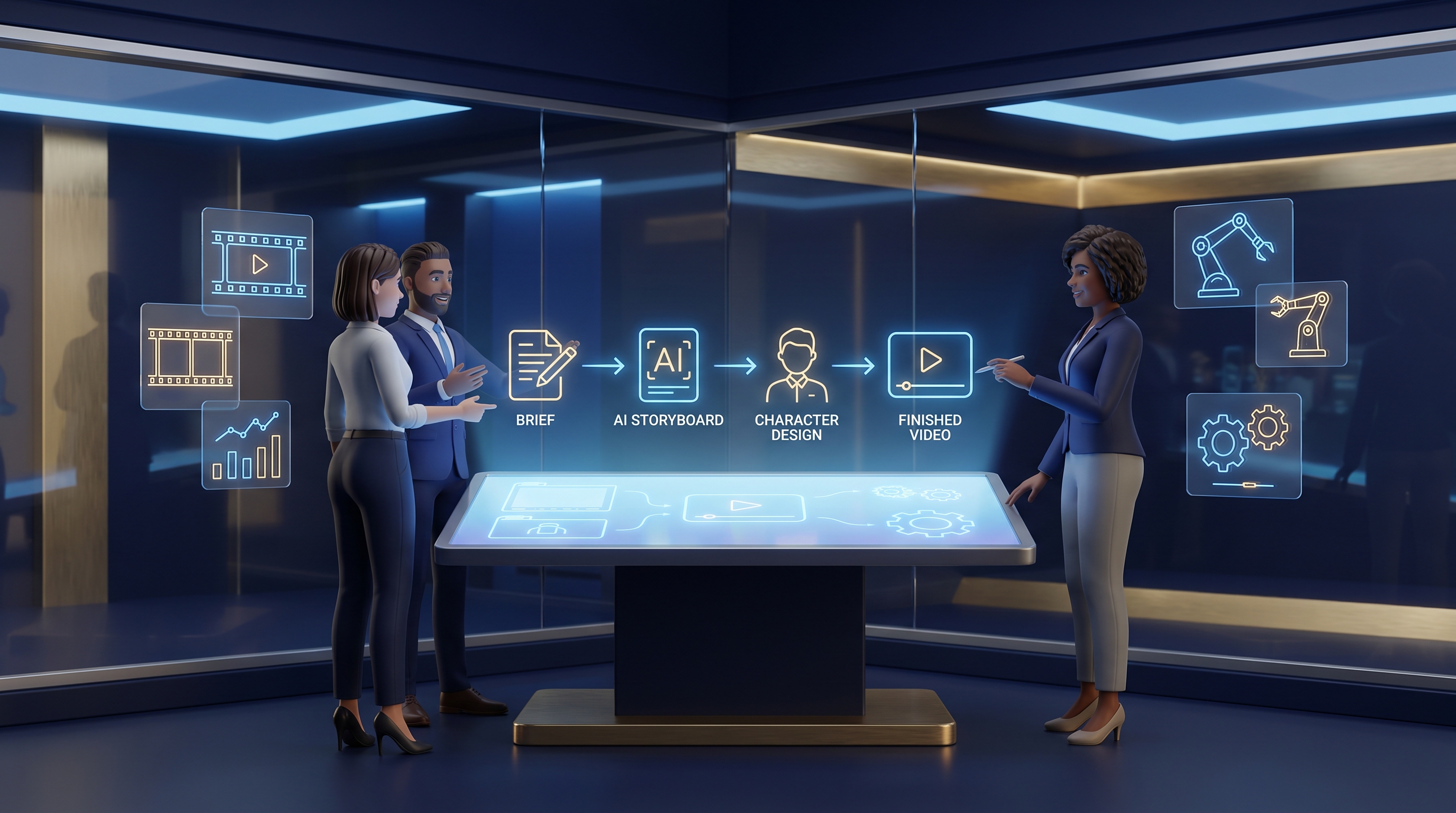
The core promise of Video Studio is simple: one place, brief to export. Let's walk the actual stages, because the value isn't any single feature — it's how they hand off to each other without losing the thread.
1. Start with the brief (or import from Script Studio)
Everything begins with intent. You can type a fresh brief — "a 75-second explainer introducing our new scheduling feature to small clinics" — or import directly from Script Studio if you've already written the script there. Importing matters more than it sounds: it means the words you approved are the words the storyboard, keyframes, and voice-over are built from. No retyping. No version mismatch.
2. AI storyboard
Next, the studio drafts a storyboard — a shot-by-shot plan that maps each beat of your script to a visual idea. This is where most people's video projects used to die, because a blank storyboard is intimidating. Getting a structured first draft to react to is dramatically faster than starting from nothing. You edit, reorder, and cut shots until the flow feels right.
3. Character references
If your video features recurring people or a mascot, character references lock in a consistent look so the same "friendly clinic receptionist" appears across every scene instead of morphing into a different person each shot. Consistency is what separates a polished video from an obviously cobbled-together one.
4. Scene keyframes
From the storyboard, you generate scene keyframes — the anchor images for each shot. These are your visual checkpoints. Get the keyframes right and the rest of the pipeline has a solid foundation.
5. Image-to-video clips
Keyframes become motion through image-to-video clips. Each still scene gains movement, turning a slideshow into something that feels alive.
6. Voice-over
Add a voice-over that reads your approved script, timed to the clips. Because the script came through the same studio, the narration matches the visuals instead of fighting them.
7. Thumbnail and assembly export
Finally, generate a thumbnail (the unsung hero of click-through rates) and run the assembly export to stitch clips, voice, and timing into a finished video ready to publish.
Notice what happened: no app-switching, no re-uploading, no "wait, which version is final?" The brief threads through all seven stages. That continuity is the whole point.
How Your AI Team Fits In: Mason, Juno, and Aria
Here's the part people miss. The Video Studio is the production floor — but Prime AI Team also gives you AI agents you can simply talk to. Knowing when to chat versus when to open the studio is the single biggest lever on how fast (and how well) your videos ship.
Think of it like this: you chat to think; you open the studio to build. The chat is where strategy, structure, and judgment live. The studio is where execution happens. Use the wrong one for the wrong job and you'll either over-engineer a simple clip or under-plan a complex one.
When to chat with Mason
Mason is your go-to when the question is what should this video even be? Before you generate a single keyframe, it's worth a conversation:
- "We're launching a feature for dental clinics. Should we make one explainer or three short social clips?"
- "Our last product video flopped — help me figure out why the message didn't land."
- "What's the right length and tone for a video that lives on a pricing page versus an Instagram feed?"
Chatting through these before you build saves you from producing a beautiful video that answers the wrong question.
When to chat with Juno
Juno shines on structure and narrative flow — the connective tissue between a raw idea and a shootable script. Use the chat to pressure-test your story arc, tighten the hook, or decide which proof points earn a scene and which get cut. A 75-second video has room for maybe four ideas; Juno helps you choose the right four and order them so the viewer never gets lost.
When to chat with Aria
Aria is your finishing and polish partner — voice, phrasing, the line that makes a thumbnail title pop, the subtle rewrite that turns a clunky voice-over sentence into something that sounds natural read aloud. When the bones are right but the delivery feels off, that's an Aria conversation.
When to skip the chat and open the studio
If you already have an approved script and a clear visual direction, don't overthink it — open Video Studio and start building. Import your script, generate the storyboard, and move through the stages. The agents are there for judgment calls and unsticking yourself, not for narrating every click. The fastest teams chat at the forks in the road and build confidently on the straightaways.
Three Mini Examples From Real-ish Teams
The solo freelancer. A freelance brand consultant needed a portfolio reel showing her process. She chatted with Mason to decide on a 60-second format, then with Juno to structure it into three beats: problem, approach, result. She imported the resulting script into Video Studio, generated a storyboard, locked a character reference for the on-screen "client" figure, and exported a finished clip in an afternoon. Previously she'd outsourced this and waited two weeks for a draft she hated.
The five-person startup. A small SaaS team had a new integration to announce. Instead of a 3-week scramble, the marketer wrote the announcement in Script Studio, imported it into Video Studio, and produced a 45-second clip with matching keyframes and voice-over. They generated three thumbnail options and ran them past Aria for the punchiest title. Shipped same day as the feature.
The local service business. A two-person physiotherapy clinic wanted a "what to expect on your first visit" video to cut down on repetitive phone questions. They had no script and no idea where to start, so they chatted with Mason about scope and Juno about the right reassuring tone. The studio handled the rest. Phone questions about first visits dropped noticeably within a month.
The common thread: nobody hired a production crew, and nobody got stuck in tool-hopping limbo. They used the chat to make decisions and the studio to make the video.
What Most Video Tools Get Wrong
Plenty of tools can generate a video. Far fewer help you produce the right video, reliably, as part of a real workflow. Here's where most of them stumble — and what to watch for.
They treat generation as the whole job. A clip generator hands you raw output and washes its hands of it. But raw output isn't a finished video — it needs structure, consistency, voice, a thumbnail, and assembly. Tools that stop at "here's a clip" leave you to reassemble everything elsewhere, which is exactly the tool-hopping problem you were trying to escape.
They lose the thread between stages. This is the big one. If your script, storyboard, and voice-over don't share a source, they drift apart. You end up with narration that doesn't match the visuals and a storyboard that contradicts the script. A studio that carries the brief through every stage avoids this entirely.
They ignore character consistency. Nothing screams "auto-generated" like a recurring person whose face changes every scene. Tools without proper character references produce videos that feel uncanny and amateur.
They skip the unglamorous bits. Thumbnails drive clicks. Voice-over timing makes or breaks comprehension. Assembly export is what turns parts into a publishable whole. Tools that treat these as afterthoughts leave you doing the boring, fiddly work by hand.
A few honest limits worth naming. AI-assisted video is fast and capable, but it's not a substitute for human judgment in every case:
- Compliance and claims. If your video makes regulated claims — medical, financial, legal — have a qualified professional review it. The studio produces the video; it doesn't certify your claims.
- Brand-critical and high-stakes pieces. For a flagship brand campaign or anything legally sensitive, build a draft fast in the studio, then bring in human review (and licensed talent or counsel where required).
- Rights and likeness. Be thoughtful about character references and anything resembling a real person. When in doubt, get permission.
- The final watch-through. Always watch the finished export end to end before publishing. The studio gets you 90% of the way at speed; that last 10% of taste and accuracy is still a human call.
Used well, the studio removes the grind so your judgment goes where it actually matters.
Your First Week With Video Studio: A Simple Plan
If you're staring at the studio wondering where to start, here's a low-risk way to build confidence in five short sessions.
- Day 1 — Pick one small win. Choose a single 30–60 second video you've been putting off. A how-to, an announcement, a "what to expect" clip. Small scope, real value.
- Day 2 — Chat first. Talk to Mason about format and audience, then Juno about structure. Don't open the studio yet. Get the idea right while it's cheap to change.
- Day 3 — Script and import. Draft the script (in Script Studio if you like), then import it into Video Studio. Generate the storyboard and edit it until the flow feels natural.
- Day 4 — Build the visuals. Set character references, generate keyframes, turn them into image-to-video clips. Resist perfectionism — aim for "good and shipped" over "perfect and stalled."
- Day 5 — Voice, thumbnail, export, review. Add the voice-over, generate a few thumbnails, run the assembly export, then watch the whole thing end to end before publishing.
By the end of the week you'll have a finished video and a repeatable process. The second video takes half the time. The fifth becomes routine.
Frequently Asked Questions
Do I need any video editing experience to use Video Studio?
No. The studio is designed for people who have never opened a timeline editor in their life. You start from a brief or an imported script, and the studio walks you through storyboard, keyframes, clips, voice-over, thumbnail, and export as guided stages. If you can describe what you want and make decisions about what looks right, you can produce a video. That said, a little taste helps — knowing when a shot feels too long or a thumbnail looks cluttered. The good news is those instincts develop fast once you're producing real videos instead of wrestling with software.
How is chatting with the AI team different from using the studio?
Think of chat as the planning room and the studio as the production floor. You chat with Mason, Juno, or Aria to make decisions — what video to make, how to structure the story, how to phrase the voice-over or thumbnail title. You open the Video Studio to actually build the thing: storyboard, keyframes, clips, assembly, export. The fastest workflow uses both. Chat at the forks where judgment matters, then build confidently in the studio once the direction is clear. If you already have an approved script and a clear vision, you can skip straight to the studio.
Can I reuse a script I already wrote in Script Studio?
Yes, and you should. Video Studio imports directly from Script Studio, which means the words you already approved become the foundation for your storyboard, scene keyframes, and voice-over. This is more valuable than it first appears: importing keeps a single source of truth, so your narration matches your visuals and nothing drifts out of sync between stages. It also saves you from retyping and from the version-confusion that plagues multi-tool workflows. Write once, build once, and let the brief thread through the entire pipeline from first scene to final export.
Will AI-generated videos look generic or obviously automated?
They can — if you skip the steps that create polish. The usual giveaways are inconsistent characters, mismatched voice-over timing, and lazy thumbnails. Video Studio addresses these directly: character references keep faces and figures consistent across scenes, voice-over is timed to your clips, and you can generate and choose thumbnails deliberately. The other half is your judgment. Spend a few extra minutes editing the storyboard, picking the right keyframes, and watching the final export. The difference between "obviously automated" and "genuinely good" is usually about ten minutes of human taste applied at the right moments.
When should I still bring in a human professional?
When the stakes or the rules demand it. If your video makes regulated claims — medical, financial, or legal — have a qualified professional review the content before publishing. For flagship brand campaigns where production quality directly affects perception, use the studio to produce a fast draft, then layer in human review or licensed talent. Be careful with character references that resemble real people, and get permission where appropriate. The studio's job is to remove the grind and get you 90% of the way at speed. The final 10% — accuracy, compliance, brand taste — is still a human responsibility worth taking seriously.
The Real Win: Finishing Videos Instead of Starting Them
The hardest part of video has never been the recording or the rendering. It's the coordination — the handoffs, the drift, the waiting, the quiet abandonment of half-finished projects. A single Video Studio that carries your brief from storyboard to export removes the friction that kills most videos before they ship. And pairing that studio with an AI team you can actually talk to means you make the right decisions before you build, not after you've wasted an afternoon on the wrong concept.
The marketing manager from the opening? With the right workflow, her three-week explainer becomes an afternoon's work — and the next one is faster still. That's the shift Prime AI Team is built to enable: not just generating clips, but giving small teams a dependable way to go from idea to published video without an agency, a crew, or a tangle of disconnected apps.
If you've got one small video you've been putting off, that's the perfect place to start. Chat with Mason or Juno to nail the concept, then Try Video Studio and ship it this week.